How I Build a Strategic Communication Plan That Actually Works

Written by: Rachael Van Cleave, South Jordan City Public Information Officer

It’s the beginning of a new fiscal year, and around here, that means one thing—it’s planning season. Time to pause the daily scramble and zoom out a little.

Strategic planning doesn’t have to be overwhelming. In fact, I’ve come to really enjoy the process. It’s our opportunity to reset, realign, and build a roadmap that makes all the daily work feel more intentional. And whether you’re a solo PIO or working with a full team, the process I use can scale.

Here’s a look at how we do it in South Jordan—and how you can use the same approach wherever you are.

Step 1: R is for Research (and Reflection)

We start by gathering the team for a look-back. What did we accomplish last year? What went well? What didn’t? Did we meet our objectives—or did we even have clear ones to begin with?

We pull engagement data, web traffic, media coverage, and campaign outcomes to see what worked and where we stumbled. Sometimes our biggest lessons come from what didn’t go quite right.

We also talk about trends—both local and industry-wide. Are there changes in public behavior, platform algorithms, legislation, or technology that might affect how we reach people this year?

At the same time, I reach out to department heads. I just ask—what’s coming up this year? Any big initiatives, shifts, or potential communication challenges? These early conversations help us anticipate, instead of react.

👉 Quick win: Don’t have time for a full survey? We’ve done fast sentiment analysis by pulling social media comments on a specific issue and pasting them into ChatGPT for a quick read on public perception. It’s not scientific, but it’s fast, free, and often surprisingly accurate.

Step 2: P is for Planning (This Is the Fun Part)

Once we’ve gathered our intel, we get into the big-picture questions:

  • Where do we want to go this year?
  • What should we be known for?
  • What are we trying to move the needle on?

We usually land on 3–5 big goals. These are high-level and values-based. For example:

“To be set apart as a proactive, transparent city that connects with residents through timely, meaningful communication.”

From there, we set three core priorities for the year. These are more focused—things like increasing public engagement with safety messaging or improving internal communication workflows.

Each priority gets at least one SMART objective—that’s Specific, Measurable, Achievable, Relevant, and Time-bound. A good one sounds like this:

“Increase average engagement rate on traffic safety videos by 25% by the end of Q2.”

This is where the clarity happens. Vague intentions become trackable outcomes.

Here’s a SMART objective formula you can use with a breakdown:

To [desired response type] among [specific audience] by [specific measurable amount or result] by [deadline].

Formula Breakdown:

  • To → action-oriented verb tied to the response type (e.g., increase, drive, reduce, improve)
  • [desired response type] → awareness, engagement, behavior change, etc.
  • [specific audience] → who you’re targeting (e.g., residents ages 25–45, business owners, parents of school-aged children, legislators, residents, etc.)
  • [specific measurable amount or result] → % increase, total clicks, form completions, event attendance, etc.
  • [deadline] → quarter, specific date, or fiscal year end

Step 3: I is for Implementation (Time to Get Tactical)

Now we build out our campaigns and plans that will help us hit those SMART objectives.

Each plan includes:

  • Who the audience is
  • What action or change we want from them (awareness, participation, opt-in, etc.)
  • Key messages and creative approach
  • Channels we’ll use (email, social, video, media, etc.)
  • Who’s responsible and when it’s due

Then we operationalize it.

We use Smartsheet to assign tasks, attach deadlines, and map each campaign to the objective it supports. If something’s got lots of moving parts or involves multiple departments, we’ll back that up with Outlook calendar reminders to keep everyone on track.

For example:

  • For Pure SoJo, we developed a comprehensive campaign to educate the public about advanced water purification. The goal? Shift perception from fear or skepticism to curiosity and trust.
  • For the Bees Ballpark, we realized many residents didn’t know it was actually in South Jordan. We adjusted quickly, built an awareness campaign, and tracked what changed in sentiment and engagement from there.

Step 4: E is for Evaluation (Don’t Skip This!)

Every quarter, we revisit our objectives and see how we’re doing. Did we meet the benchmarks? Are we trending in the right direction? What’s working and what needs to be retooled?

This is where we learn fast and adjust. Sometimes, our research didn’t uncover something important. Sometimes the campaign just didn’t hit. But this step keeps us nimble and focused on outcomes, not just outputs.

We also document everything—so next year’s planning process is informed by real data, not just gut feelings.

Tools We Use

These don’t have to break the bank:

  • ChatGPT – for brainstorming, sentiment analysis, summaries, and even drafting first versions
  • Smartsheet – project management and campaign tracking
  • Outlook – deadlines, reminders, meeting scheduling
  • Canva Pro, Adobe Express – creative tools for campaign materials
  • Native analytics tools on platforms like Meta, YouTube, Constant Contact, etc.
  • Google Forms or Microsoft Forms – quick surveys or feedback forms

Try This Today

If you’re looking to get started (or just reset mid-year), here are some steps you can take right now:

✅ Schedule a planning session—even a one-hour one—with yourself or your team
✅ Write down your top 3 accomplishments and 3 lessons learned from the past year
✅ Reach out to 2–3 internal departments and ask: “What’s coming up that may need communications support?”
✅ Pick one goal and write a SMART objective for it
✅ Identify one piece of low-cost or free research you can do this week
✅ Choose one priority project and start a basic plan (audience, outcome, channels)
✅ Put it all on a calendar and check back quarterly

Strategic communication isn’t about being reactive—it’s about being ready. The RPIE process keeps us grounded and adaptable, and it reminds us that good communication is never accidental.

Here’s to a new year of thoughtful, impactful work. Let’s plan like we mean it.

*ChatGPT was used to assist with this blog.

Social media tips: Recap of the August quarterly meeting (Part 1 – Facebook groups)

By Joe Dougherty, PIO
Utah Division of Emergency Management

When it comes to social media, there are two platforms that are essential: Twitter and Facebook. Do both well, and you establish your organization as a credible source of information with those who are consuming your content digitally.

Zach Whitney from UDOT discusses Facebook groups for government pages.

During our quarterly training luncheon in Park City on August 15, Zach Whitney from UDOT (@zachwhitneynews) and I (@PIO_Joe) shared some tips about using those two platforms more effectively to reach people who care about your message and to filter out the noise.

Zach’s presentation information is here and mine is in the next post, Part 2 – Maximizing Your Twitter Game.

Facebook Groups for Government Agencies

If you are going to do social media, and among the platforms you are using is Facebook, then Zach Whitney says that it’s important that you give people information that they actually want.

Facebook’s recent emphasis on giving users the chance to make more meaningful connections brought about the ability for pages to create and join community pages.

Zach’s slides are here, and you can see his takeaways below.

Join community groups

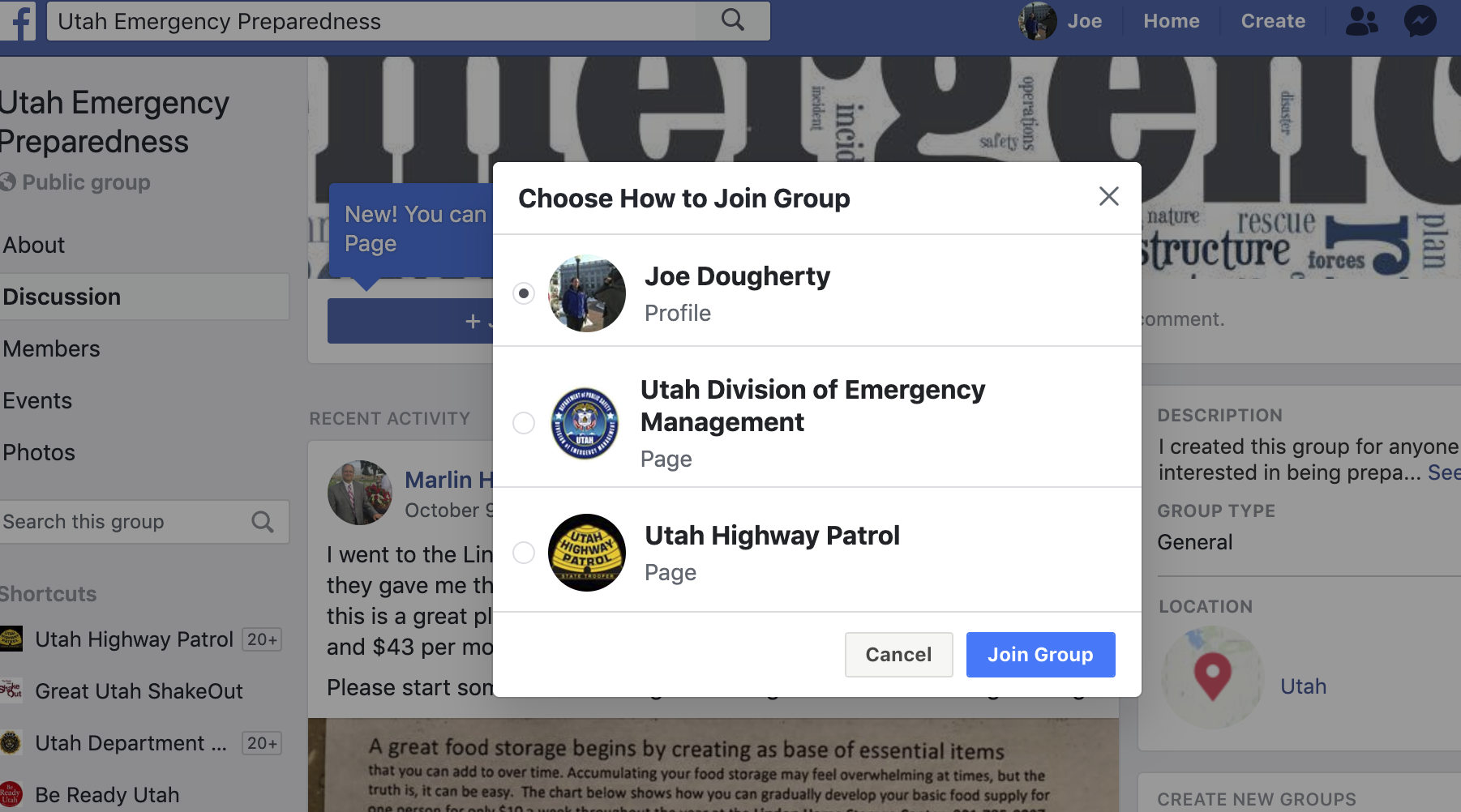
Let’s take it for a spin. Find a group you would like to join as a page. In this case, I am requesting to join a group called Utah Emergency Preparedness. Then, I select that I want to join as my page for the Utah Division of Emergency Management instead of as myself.

Group administrators have the ability in their group settings to decide whether to allow pages to join or not. I tried joining a Herriman emergency preparedness group, but it would only allow me to join from my profile.

There are various groups you could consider joining as your page.

  • Community 411/rumor groups (They go by different names in each county.)
  • County “yard sale” groups
  • Groups organized by topic (such as emergency preparedness)

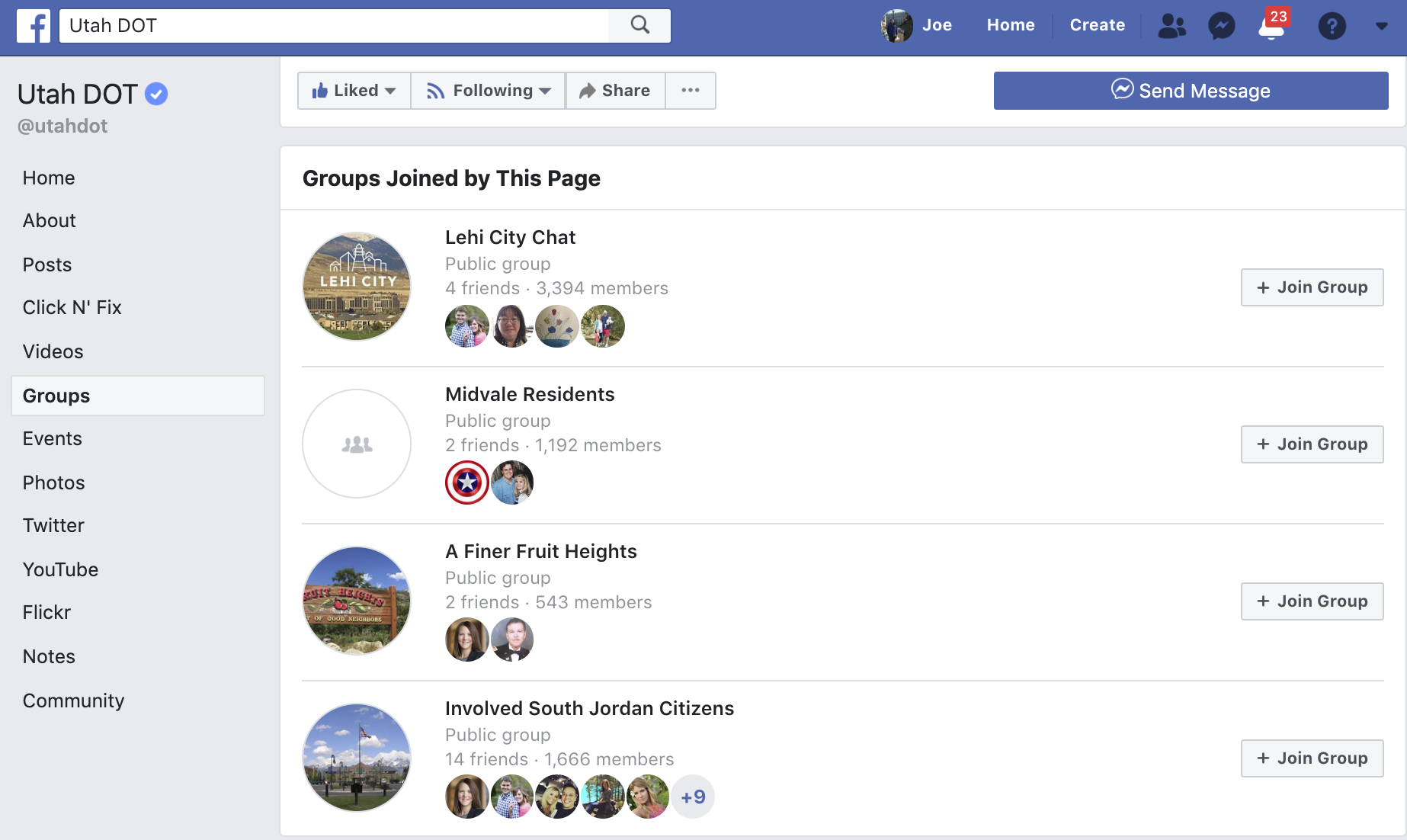
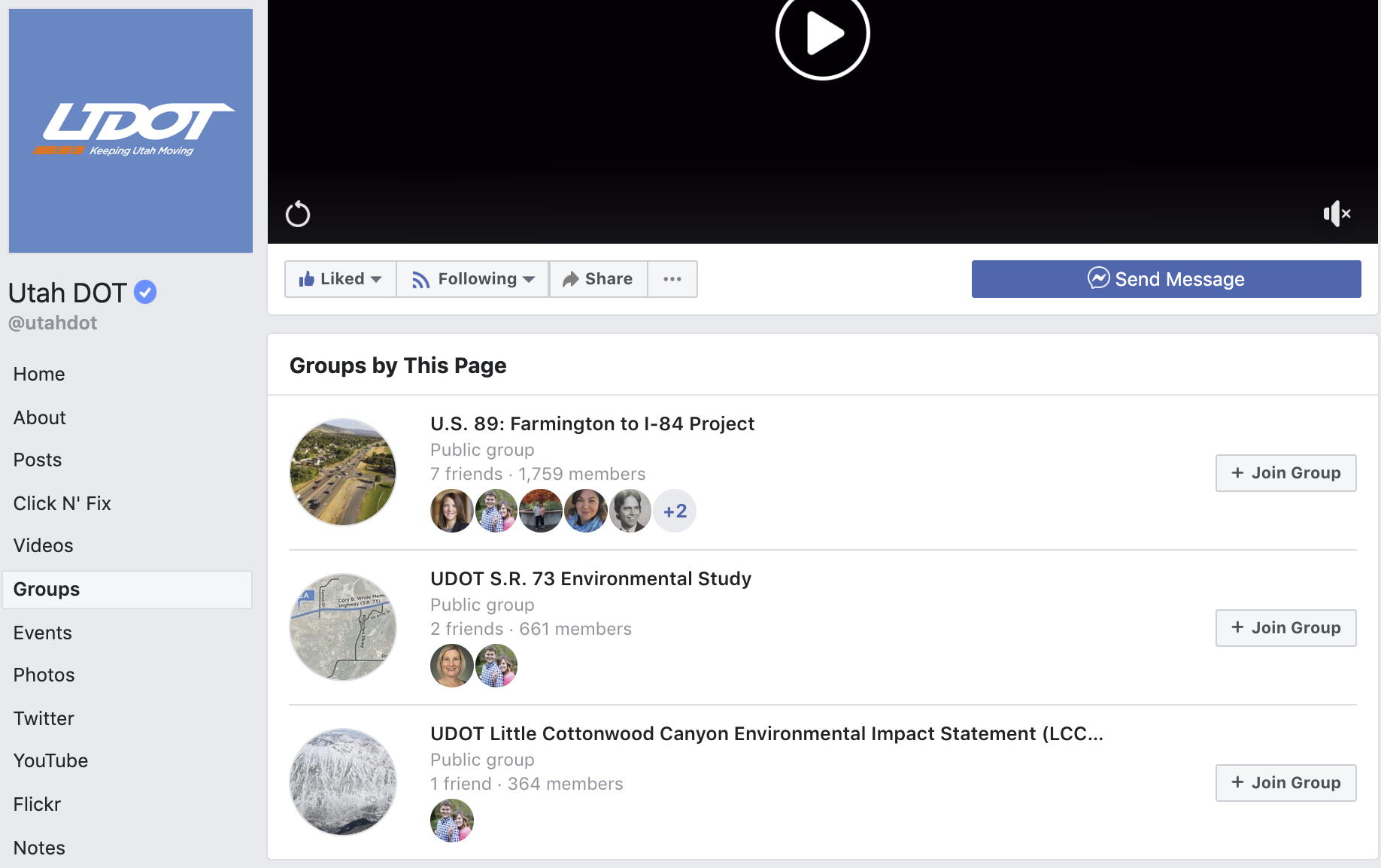
Here are examples of groups UDOT has joined

a screen shot of the facebook groups U-DOT has created, including the U.S. 89 Farmington to interstate 84 project and an environmental study for state route 73

Create your own group

UDOT has created community groups (make sure you’re logged into Facebook to use that link) for specific construction projects and environmental studies and statements.

Here’s how you do it:

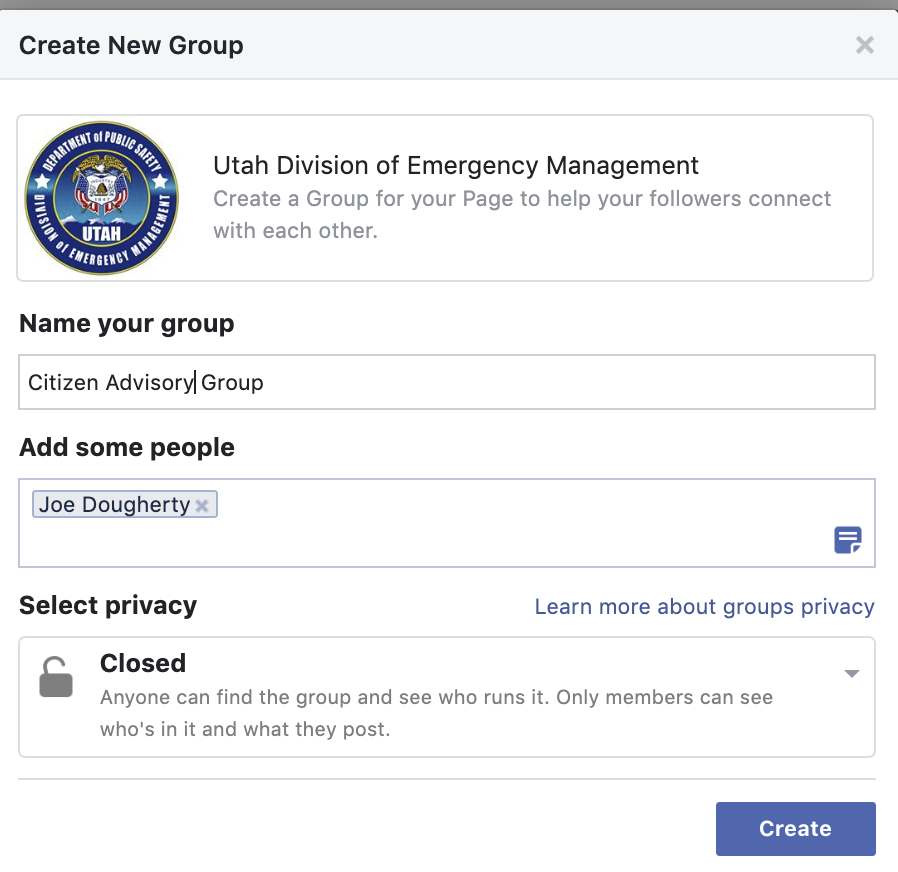
This is NOT an actual group we’re creating. This is just for demonstration purposes today. But who knows? Someday, we could create this group.

As a page manager, go to your page and click groups on the left-hand side.
Click “create group.” Name it, select administrators and a privacy setting and begin posting. Make sure to invite some people to your group. And spend some time in the various group settings.

Remember, the goal is engagement. How can you help foster conversations among group members so they have meaningful interactions? What will be most valuable to them?

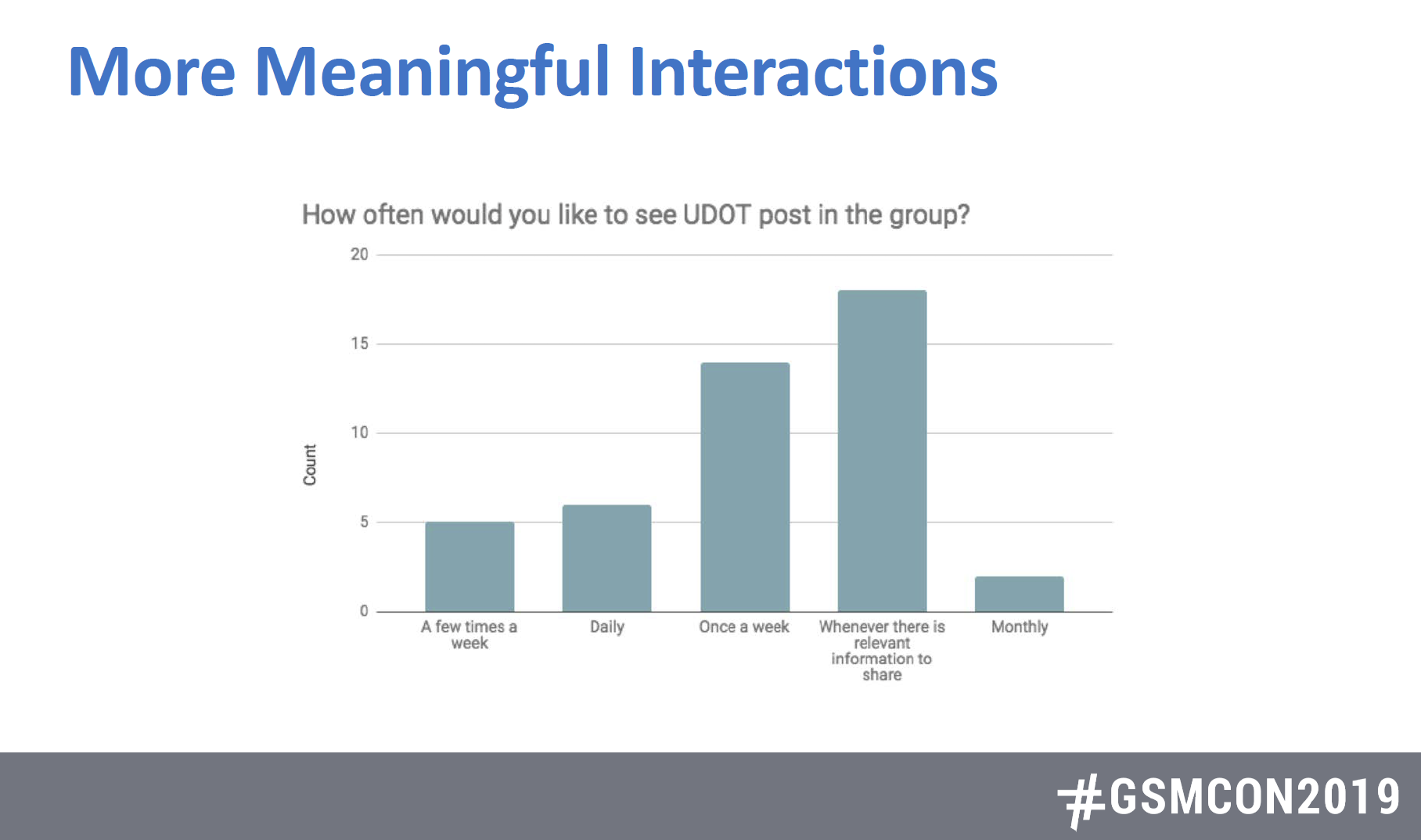
This is what UDOT knows about its followers in the group. They want information when it’s relevant to them. Zach said they tried having some fun with some posts, but people were more interested in the relevant information. Their point? Just get us the information we came here to get.

This chart displays survey results from the question "how often would you like to see U-DOT post in the group: The lowest recorded responses were a few times a week, daily and monthly. The highest responses were for once a week and whenever there is relevant information

Join some groups

If you haven’t joined any groups, either as a person or a page, consider searching for something you are passionate about in Facebook’s search bar and then refine your search by groups.

If you haven’t yet, consider joining the Utah PIO Association on Facebook. Come in, ask a question, and watch the PIOs come up with responses.

Don’t forget email

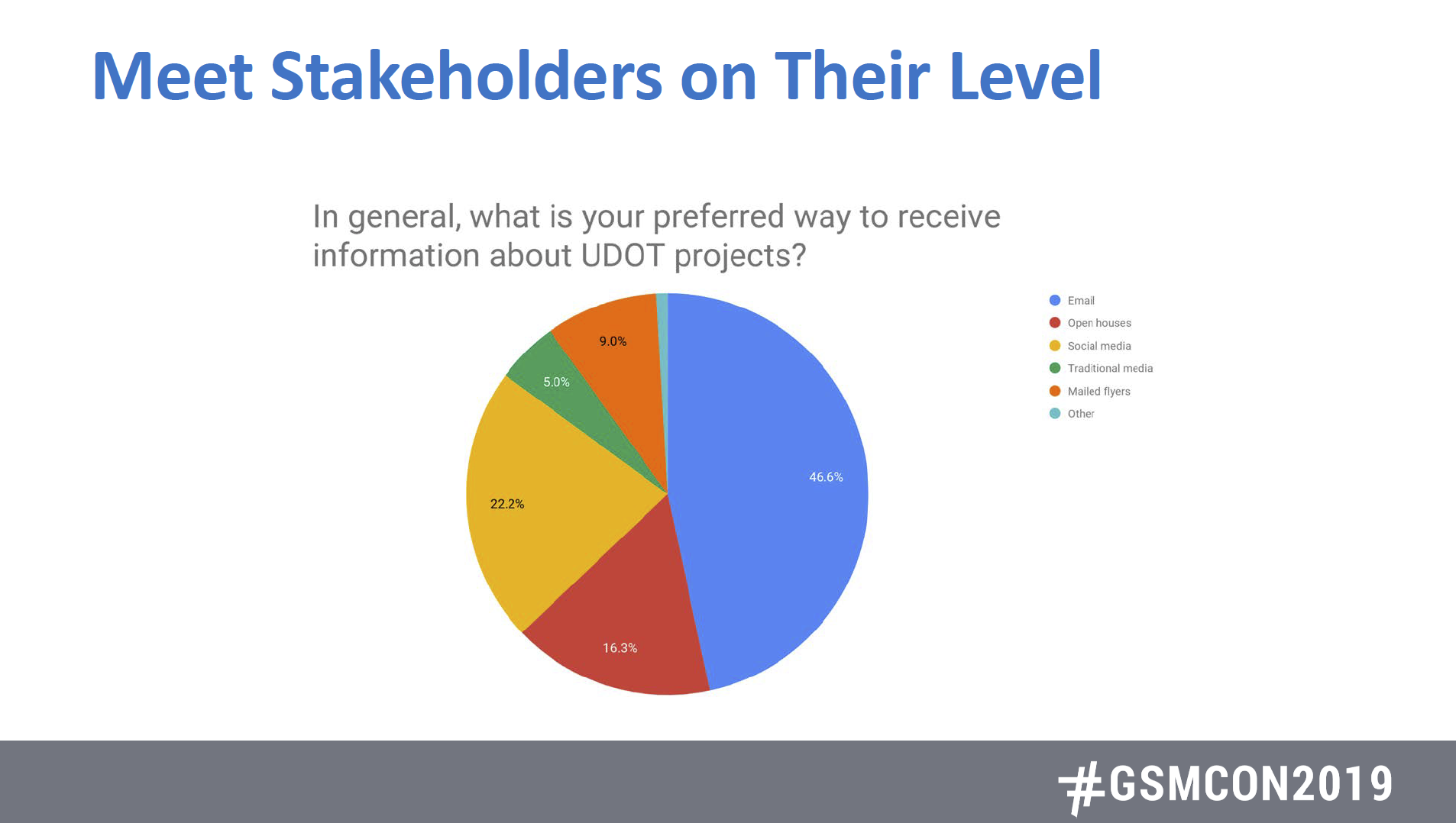
If you’re doing social media, do it the best you can. Though it’s tempting to put all of our eggs in the basket of social media, it can’t be the only way we reach people. Check out these stats from UDOT’s survey to its stakeholders.

A well-written, well-timed email will still do wonders to get people the information they want.

This pie chart shows that 46 percent of U-DOT's stakeholders prefer to receive information via email. compared to 22 percent who prefer social media, 16 percent in open houses, 9 percent with mailed flyers and 5 percent through traditional media.

Want to see part 2 of our recap of the quarterly meeting? My info about Twitter is here.


Zach Whitney is a digital communications specialist for the Utah Department of Transportation. zachwhitney@utah.gov.

Joe Dougherty is the public information officer for the Utah Division of Emergency Management. jdougherty@utah.gov

When you need digital/social media support

UtahVOST1 square-02

Today, Cheryl Bledsoe (Twitter.com/CherylBle), from Virtual EMA one of the pioneers of the VOST movement, held a webinar to discuss the Virtual Operations Support Team and how the team works.

In 2010, emergency managers were talking about how to harness the power of social media. They came up with the concept of the VOST to use social media “trusted agents” in diverse locations to help incident leaders have better information and complete web-based missions for emergency response.

As we know, social media helps you be more dynamic, listen to the public, share information and help incident command get intelligence.

Some web-based teams you may have heard of include Humanity Road or the American Red Cross’s digital engagement teams. But VOST is different.

The goal: Provide a snapshot of what is happening on social media as a member of the EOC or incident command. VOSTs can look for rumors and misinformation, threats and copycats, unsolicited volunteers, etc.

They curate and bring that information together and prepare narrative listening reports, filtering out the noise and clutter of social media.

Missions can be long (during a wildfire) or short.

Case study: Umpqua Community College shooting, October 2015

  • 10-member VOST, but only used 2-3 people per day. Mission was active for 17 days.
  • Evaluated spontaneous volunteers and fundraisers.
  • Presidential visit

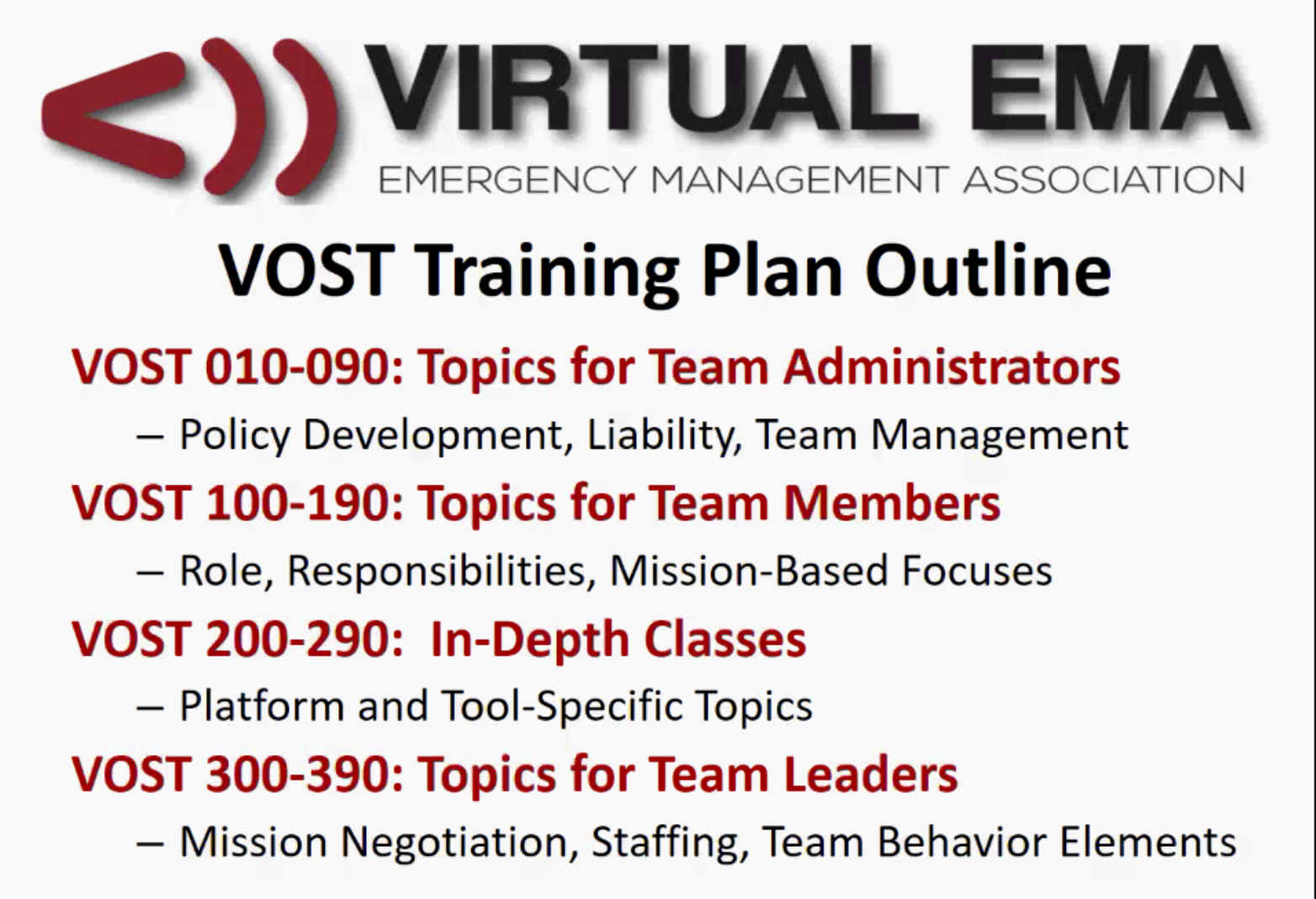
VOST training available

Screen Shot 2017-11-03 at 10.20.58 AM

Where we would like to go in Utah:

  • Conduct training: Virtual EMA does training on Fridays and Saturdays.
  • Build our team to be capable identifying rumors and misinformation.
  • Become skilled at curating social media messages and images.
  • Understand and become proficient at the tools that are available.
  • PIOs should consider becoming VOST team members.

If you would like to be part of UtahVOST1, contact Joe Dougherty, jdougherty@utah.gov.


Joe Dougherty, @PIO_Joe

How to not mess up your social media

First, huge thanks to Cottonwood Heights and Dan Metcalf for hosting the PIOs for the quarterly training luncheon on Wednesday. To show we mean the thanks, Dan gets free entry into the PIO Conference in September, as does anyone who hosts one of these meetings.

Now, onto the stuff: Social media tips from Dan Metcalf. Tomorrow, we’ll have notes from Ben Horsley’s presentation.

Watch for social media pitfalls

  • You still work for and represent your agency, even when you are off duty. What you say on your personal social media accounts still reflects on you and your agency.
  • Watch the context. Basically, make sure to research hashtags before jumping on and tweeting with them.
  • Be careful with humor. It can personalize your agency, but can go dreadfully wrong when misused.
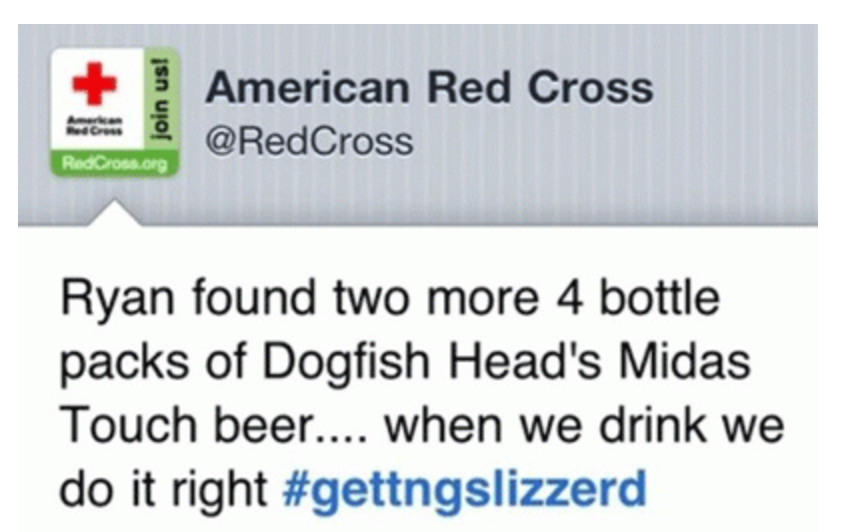
  • Before you tweet, make certain you are logged into the appropriate social profile. It’s hard to make a worse mistake than tweeting a personal opinion via an agency account. Don’t do it! Two examples below.
Screen Shot 2017-05-04 at 1.25.38 PM
Click above to read the story on this one.
Screen Shot 2017-05-04 at 1.23.50 PM
Click above to read the story.

Social policies

You need an internal policy that addresses employees’ use of official channels, including social media training and monitoring, best practices and the number of people with access to those channels.

You also need an external policy that addresses your community standards and how you can justify the removal of posts on your pages while upholding free speech. Some of those justifications may include: off-topic posts, political endorsements, discrimination or personal attacks, obscenity, vulgarity, spam, advertising, copyright infringement, security or safety issues.

Think before you tweet, Dan says.
Tune in tomorrow for a recap from Ben Horsley’s presentation on the Clown Hoax.

Joe Dougherty is the secretary for the PIO Association. On Twitter at @PIO_Joe.